
There is no doubt that reading books is one of the most enriching activities you can engage in. I used to see reading as a burdensome habit that required too much effort, which I couldn’t afford. Even books that interested me seemed like a waste of time. After all, scrolling through social media feels much easier and doesn’t require any mental effort. But I knew it had to change. I remembered how much enjoyment reading brought to my life as a child. Undoubtedly, reading is a much more valuable activity than scrolling through social media. According to “Healthy Happy Impactful,” reading has the following benefits:
- Mental Health Benefits: Reading can reduce stress by up to 68%, surpassing the effectiveness of listening to music, having a cup of tea, or taking a walk.
- Cognitive Benefits: Lifelong readers have a lower rate of Alzheimer’s and other forms of dementia compared to their peers. Additionally, reading could help reduce mental decline in old age by 32%.
- Emotional Benefits: Approximately 19% of readers say that spending time with a book makes them feel less lonely, and reading for as little as six minutes can slow heart rates and ease tension.
However, everything changed for me about three years ago. I started by reading just one page a day from an interesting book, and it even helped improve my work (Getting Things Done by David Allen). I took it slow, without any pressure to finish a book within a specific timeframe. Surprisingly, I discovered that reading was the best activity for stimulating the human mind. Soon after, I found myself finishing books in just a week or two, always trying to find more time for reading each day.
Day by day, I became a better reader, constantly seeking more reading material and sacrificing social time. It has truly been the best decision I’ve made as an adult. As I improved as a reader, I also realized that the process became more interesting and complex. Instead of simply looking for new books, I started seeking better systems to retain what I read. I learned to summarize key ideas concisely. In the end, two people can read the same book and take away completely different ideas from it, depending on their experiences and ways of thinking. That’s what makes reading so enjoyable and fascinating.

Step 1 – Sync all of your highlights to Readwise
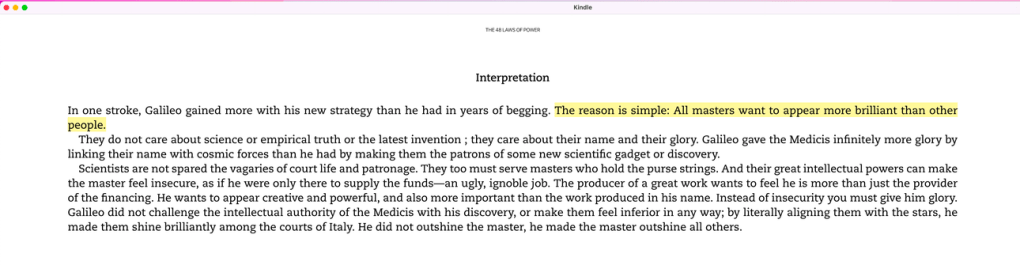
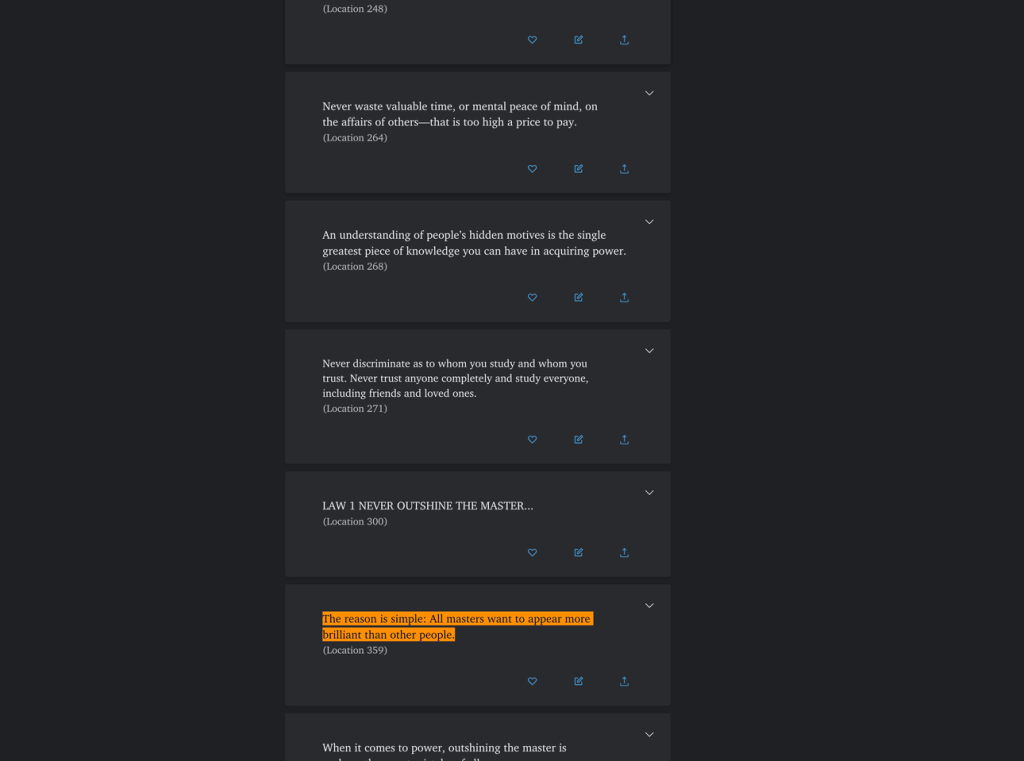
Initially, I manually copied the parts I highlighted on my Kindle to external places like iPhone’s notes. This process was time-consuming and required a lot of effort. Therefore, I searched for better solutions online and discovered “Readwise” – a fantastic tool that gathers all my highlights from Kindle, Medium, web browsers, and other reading apps that support highlighting. With Readwise, all the key ideas are exported to your “home court” where you can review, adjust, and truly understand which ideas resonate with you.
Once Readwise is integrated with your Kindle account, there’s really nothing left to do besides continuing to highlight the text you find useful and interesting. The magic happens behind the scenes, and it’s wonderful. As you can see below:
Step 2 – Exporting highlights from Readwise to Notion
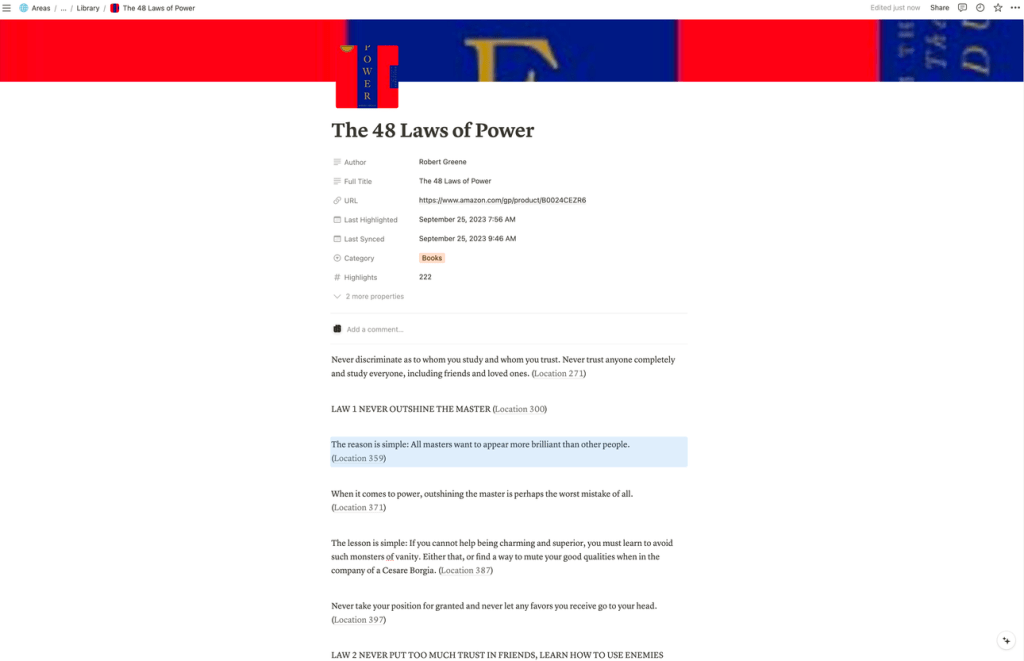
But it doesn’t end there. While having all your highlights in one place is great, you can extract even more value from them. The solution is simple – Readwise allows you to export all your highlights to a Notion workspace. Notion is an amazing tool that automatically creates a page and a database for you. It puts each asset on a separate page along with its highlights, book covers, and other information. This means that not only is all your highlighted text organized in your own workspace, but it also looks visually appealing.
Please note – To activate the Notion export feature, you will need the premium plan offered by Readwise ($7.99 per month). To learn more about the Notion integration, please refer to Readwise’s manual here.

Step 3 – Utilize Notion AI
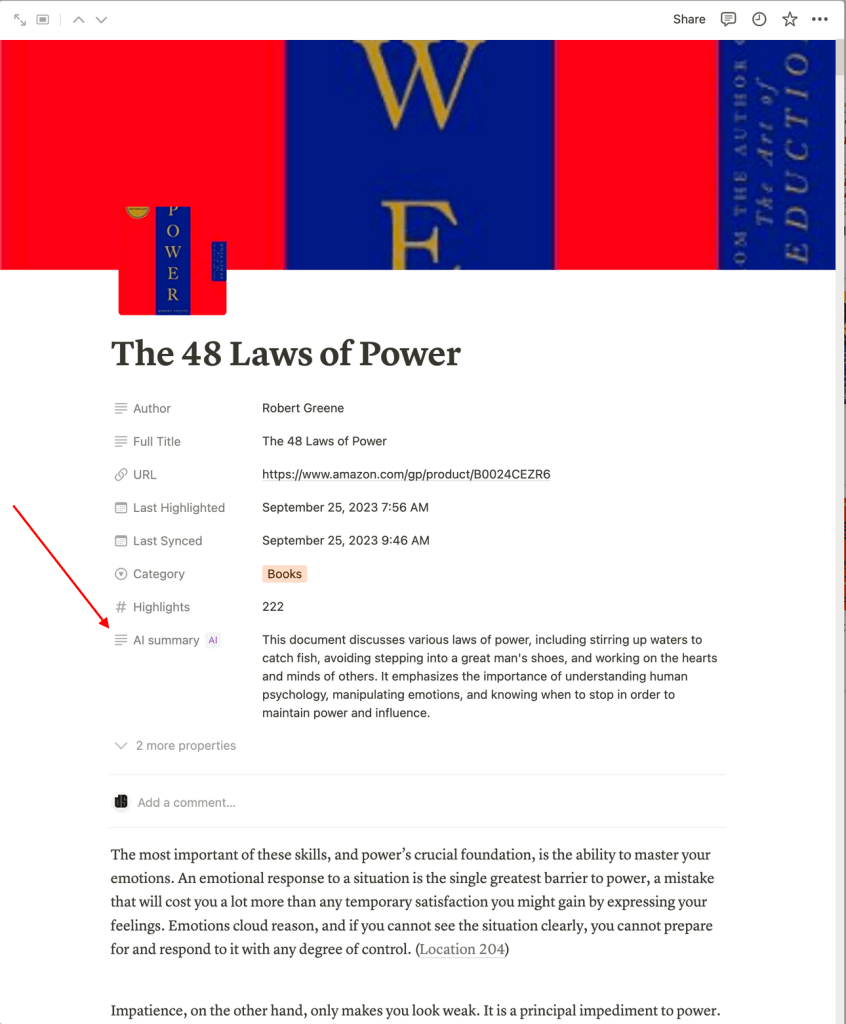
To fully harness the potential of this system, you can leverage one of Notion’s revolutionary features – Notion AI. Notion AI, similar to Chat GPT, comprehends all of Notion’s functionalities and empowers you to summarize text, generate text, create databases, automate tasks, and much more. When it comes to distilling key ideas from books, Notion AI serves as the ideal tool to make sense of all the highlights within a book. With these straightforward steps, you can obtain a summary of the highlights and key ideas:
Step 1: Within the Readwise database, add a new property named “AI summary.” This property takes the entire content of the page and generates a concise paragraph summarizing everything.
Step 2: To enhance the process, you have the option to utilize the “AI key info” property. By using this property, you can provide a prompt to guide the AI in generating a precise summary according to your preferences. For instance, the prompt I utilize is: “Key ideas from the page in bullets. Each bullet should consist of a concise sentence summarizing a key idea from the text. Please include key ideas from the entire text.”
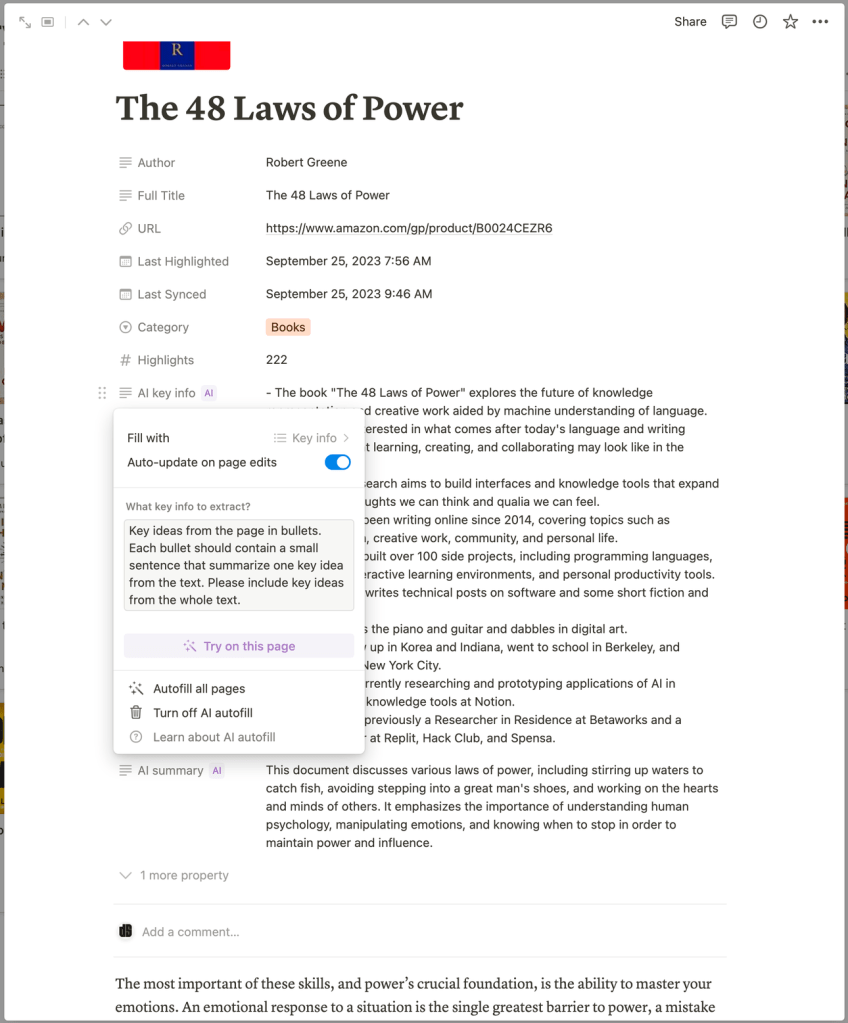

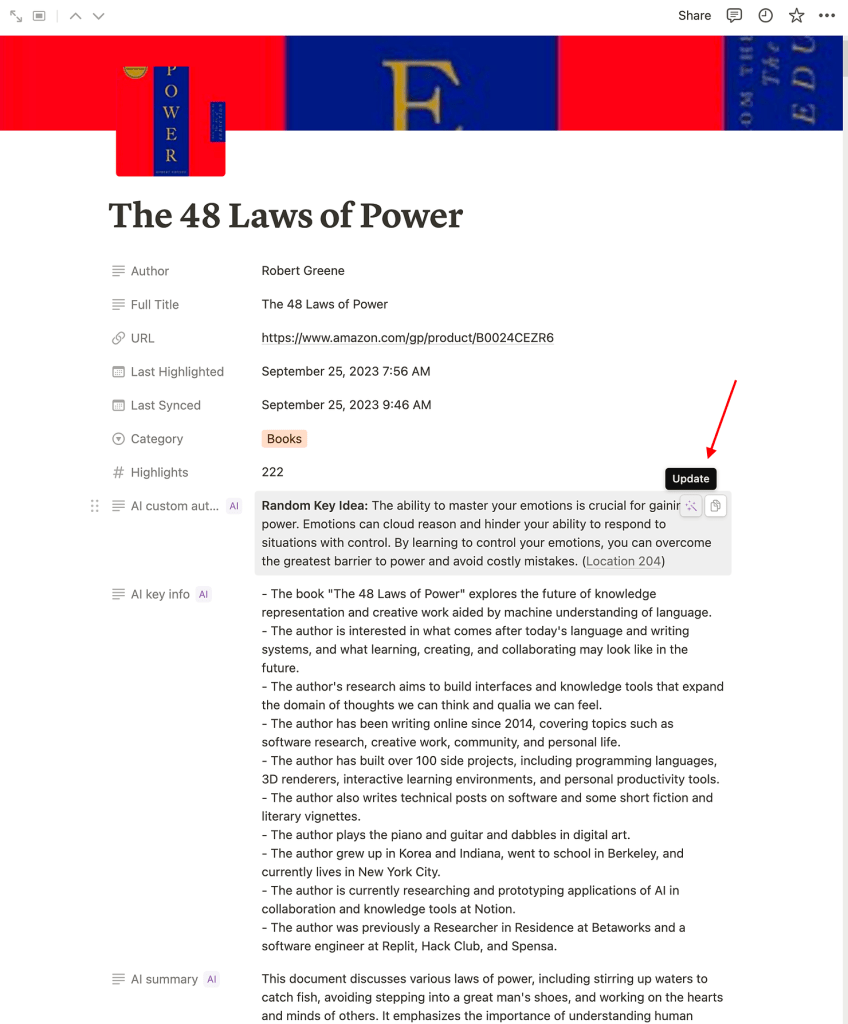
Step 3: Now it’s time to get creative! I have an example of my own, in which I ask the AI to provide me with a random key takeaway from the highlights within. I selected the property “AI custom autofill”. Here’s how I formulated the prompt: “Give me a random key idea from the text. Every time I update this property, give me another random key idea/takeaway.” This is what it looks like:

Now, when you hover over the content of the property, you can click on the magic wand icon to generate another random key idea from the content.

Step 4 – Get to see your highlights regularly
The final step in the system involves creating a database view on a regularly visited page. In my case, I have a homepage in my workspace where I created a summary of all the areas I need to keep track of, such as workout routines, tasks and projects, habits, and more. One crucial component of this is the Readwise database and the random takeaways from the books, as shown below:
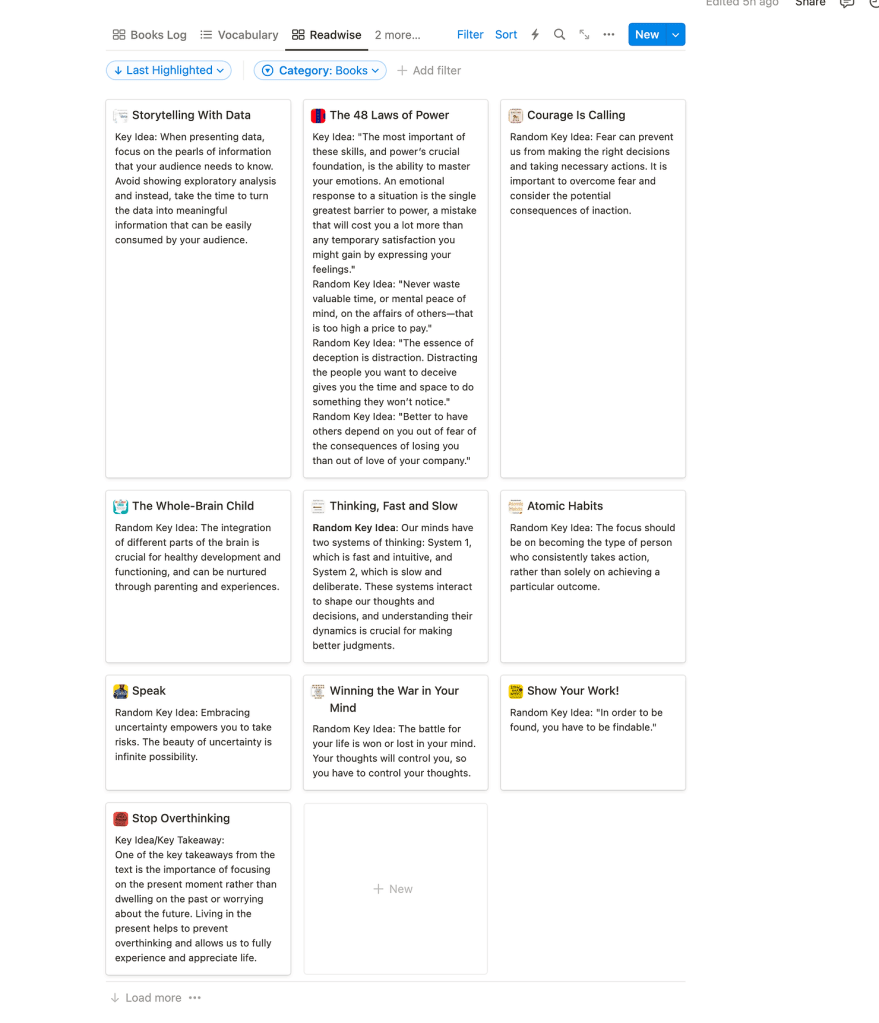
This way, I can consistently “live” those moments when I am exposed to the idea, remember them, and have those “aha” moments randomly throughout the day. It’s a real experience. When I feel lost in thoughts or in a bad mood, I turn to the database view and browse random ideas from the books. Every time, it succeeds in improving my mood and giving me some good material to think about.
To execute the exact same view, simply add a new block on the desired page and choose “Database view.” Select the Readwise library and then choose a gallery view. Make only the property of “AI custom autofill” visible, along with the book’s title. To finalize the adjustments, choose a small card size and remove the preview. Feel free to keep and modify it until you find the perfect design.
Recap
This is how I “feed” my reading system effortlessly and achieve continuous growth. All I need to do is keep reading and browse the randomly generated takeaways on my Notion homepage. This process is truly inspiring for readers, writers, or anyone who enjoys being exposed to great ideas.
As mentioned earlier, this method should not replace writing about your personal takeaways from a book as a whole. However, it does provide a wonderful way to continue engaging with books and ideas that you love, and gives you regular food for thought.
Join the “No-Code Revolution”
Now that we have explored the transformative power of no-code tools in enhancing our reading experiences, I encourage you to start your own journey. Give Readwise and Notion AI a try, and witness how they revolutionize your productivity and learning process. Remember to share your experiences, successes, and even challenges in the comments below or reach out to me directly. Your insights are invaluable, and they contribute to our collective growth in this exciting era of no-code innovation. Let’s harness the power of these tools to not only read more, but to learn and retain better!



 Marketing, Data, Automations, etc.
Leave a comment